
Form Mode
Form Mode displays a canvas alongside an auto-generated form panel. End-users fill in text, images, and colors through the form; the canvas updates in real-time. Designed for embedding via iframe when you want users to customize templates without the full editor UI.
Check out how it looks like:
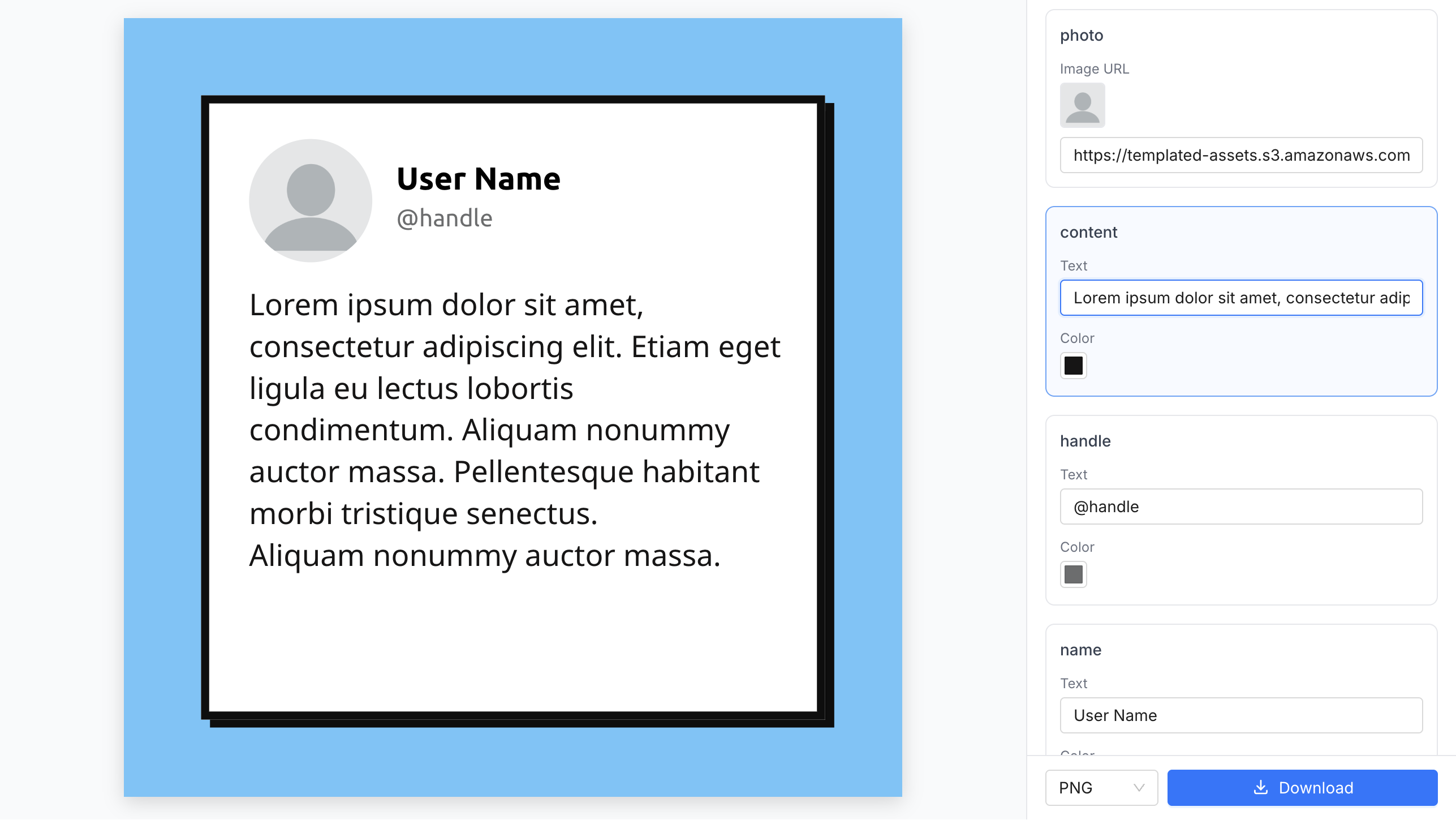
Enable Form Mode
Section titled “Enable Form Mode”Use the form base path: /editor/form/{TEMPLATE_ID}?embed={CONFIG_ID}.
<iframe id="template-embed" src="https://app.templated.io/editor/form/{$TEMPLATE_ID}?embed={$CONFIG_ID}" width="100%" height="600" frameborder="0"></iframe>URL parameters
Section titled “URL parameters”Form Configuration
Section titled “Form Configuration”form-panel-position(left|right) — form panel position, defaultright
Example with flags:
<iframe src="https://app.templated.io/editor/form/{$TEMPLATE_ID}?embed={$CONFIG_ID} &form-panel-position=left&allow-download=true" width="100%" height="600" frameborder="0"></iframe>Layer visibility
Section titled “Layer visibility”Lock layers in the editor to hide them from the form.
Unlocked layers automatically appear as form fields.
This lets you control exactly which layers end-users can customize.
Layer types
Section titled “Layer types”Each layer type renders a different set of form controls:
| Layer type | Form controls |
|---|---|
| Text | Text input + color picker |
| Image | URL input |
| Shape | Fill color picker + stroke color picker |
| QR Code | Text input for data |
| Barcode | Text input for data |
| Rating | Number input |
Runtime control (postMessage)
Section titled “Runtime control (postMessage)”After the iframe loads, you can control Form Mode at runtime using postMessage. The editor will also send events back.
Messages you can send to the editor
Section titled “Messages you can send to the editor”// Toggle form mode on or offiframe.contentWindow.postMessage({ type: 'SET_FORM_MODE', enabled: true}, '*');
// Change the form panel positioniframe.contentWindow.postMessage({ type: 'SET_FORM_PANEL_POSITION', position: 'left' // 'left' | 'right'}, '*');Events the editor sends back
Section titled “Events the editor sends back”window.addEventListener('message', (event) => { // Optional: verify origin: if (event.origin !== 'https://app.templated.io') return; const msg = event.data; switch (msg?.type) { // Form mode toggled case 'FORM_MODE_UPDATED': console.log('Form mode:', msg.enabled, 'Success:', msg.success); break;
// Panel position changed case 'FORM_PANEL_POSITION_UPDATED': console.log('Panel position:', msg.position, 'Success:', msg.success); break;
// A form field value changed case 'FORM_VALUES_CHANGED': // msg.data contains { layerName: { prop: value } } console.log('Form values changed:', msg.data); break;
// User clicked the render button in the form case 'FORM_RENDER_REQUESTED': console.log('Render requested:', msg.format, msg.templateId); break; }});Mobile
Section titled “Mobile”On screens narrower than 1024px, the form panel automatically stacks below the canvas for a mobile-friendly layout.
Complete example
Section titled “Complete example”<iframe id="template-embed" width="100%" height="700" frameborder="0"></iframe><div> <button onclick="toggleFormMode()">Toggle Form Mode</button> <button onclick="switchPanelPosition()">Switch Panel Position</button></div>
<script> const iframe = document.getElementById('template-embed'); const CONFIG_ID = 'YOUR_EMBED_CONFIG_ID'; const TEMPLATE_ID = 'tpl_ABC123';
let formEnabled = true; let panelPosition = 'right';
// 1) Initial URL-based load const url = new URL(`https://app.templated.io/editor/form/${TEMPLATE_ID}`); url.searchParams.set('embed', CONFIG_ID); url.searchParams.set('form-panel-position', 'right'); iframe.src = url.toString();
// 2) Listen for editor events window.addEventListener('message', (event) => { const msg = event.data; console.log('Received message:', msg);
switch (msg?.type) { case 'EDITOR_READY': console.log('Editor ready for interactions'); break;
case 'FORM_MODE_UPDATED': formEnabled = msg.enabled; console.log('Form mode:', formEnabled ? 'enabled' : 'disabled'); break;
case 'FORM_PANEL_POSITION_UPDATED': panelPosition = msg.position; console.log('Panel position:', panelPosition); break;
case 'FORM_VALUES_CHANGED': console.log('Form values changed:', msg.data); break;
case 'FORM_RENDER_REQUESTED': console.log('Render requested:', msg.format, msg.templateId); break; } });
// 3) Control functions function toggleFormMode() { formEnabled = !formEnabled; iframe.contentWindow.postMessage({ type: 'SET_FORM_MODE', enabled: formEnabled }, '*'); }
function switchPanelPosition() { panelPosition = panelPosition === 'right' ? 'left' : 'right'; iframe.contentWindow.postMessage({ type: 'SET_FORM_PANEL_POSITION', position: panelPosition }, '*'); }</script>