Can Claude generate images?
Not photos or illustrations, not on its own. Claude draws charts, diagrams and SVG graphics in the chat. Connect Templated and Claude hands you finished images: posts, banners and certificates as PNG, JPG, PDF or MP4, built from templates you control.
50 free credits. No credit card required.

Here's your post, rendered with your Autumn Menu template:
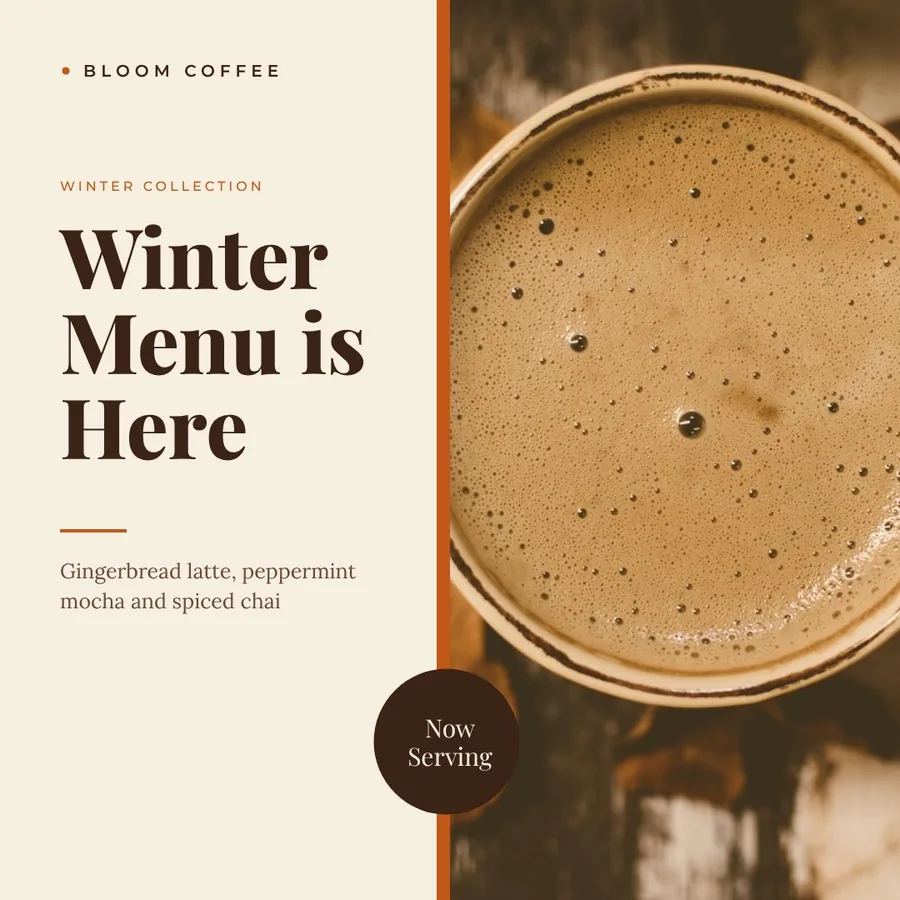
JPG, 1080 × 1080, made with Templated
The short answer
Claude is a language model. It reads images and writes the code behind charts and diagrams, but it doesn't paint pictures. A connector gives it a way to make finished image files.
What Claude makes on its own
- Charts, diagrams and interactive visuals in the chat, built with HTML and SVG. You can copy one as an image or download it as SVG or HTML.
- Data charts saved as PNG files, made by running code when file creation is turned on.
- Word, PowerPoint, Excel and PDF files.
- Reading images you upload: describing them, pulling out text, comparing them.
- Photos or illustrations from a text prompt, the way image generation tools make them.
What Claude makes with Templated
- Social posts, banners, certificates, link previews and product cards, built from your templates.
- The exact text you asked for, in your fonts, colors and logo, with the same layout every time.
- PNG, JPG, WebP, multi-page PDF or MP4, returned as a link in the chat.
- One image per row of a list: a certificate for every name, a card for every product.
- New templates designed from a description, ready to fill again later.
Sources, from the Claude Help Center (checked November 2026): Can Claude produce images?, Custom visuals in chat, Create and edit files.
Three requests, three finished images
Each image below came back from the prompt next to it, through the Templated connector. Real renders, not mockups.
Instagram post
Result: JPG, 1080 × 1080
Banner
Result: JPG, 1200 × 630

Certificate
Result: JPG, 1123 × 794 (PDF on request)

Connect Templated to Claude in 3 steps
- 1
Step 1: Create a free Templated account
Sign up with Google or email. You get 50 free credits and don't need a credit card.
- 2
Step 2: Connect it in Claude
Open Templated in the Claude directory and click Connect, or search for Templated under Customize → Connectors. On Team and Enterprise plans, an Owner enables it first.
- 3
Step 3: Ask for an image
Start a new chat and begin with "Use Templated to". Claude finds a template, fills it and sends you the link. It works on the web, in Claude Desktop and in the mobile apps.
Using Claude Code?
Add the Templated server with one command, then sign in when Claude Code asks. For Cursor, ChatGPT and other clients, see the MCP setup.
claude mcp add --transport http templated https://mcp.templated.io/mcpPrompts to try
Start with "Use Templated to" so Claude reaches for your templates. Then say what to make, the size and the text.
Use Templated to make a 1080x1080 Instagram post for our Black Friday sale: 30% off everything until Monday.
Use Templated to create a certificate for each name in this list, then merge them into one PDF.
Use Templated to make a 1200x630 link preview image for my blog post "How We Cut Shipping Costs by 20%".
Use Templated to design a story template for our weekly specials, then fill it with this week's dishes.
Use Templated to render my product card template for these five products and give me the links.
Use Templated to turn this quote into a 1080x1920 MP4 for Reels: "Small steps, every day."
Filling a template vs. generating an image
Templated is the first kind. It won't invent a photo, and it types your headline exactly as you wrote it.
| Aspect | Templated, filling a template | AI image generator |
|---|---|---|
| What you get | Your design, filled with new text, images and colors | A new picture painted from your prompt |
| Text | Exactly what you typed, in your fonts | Drawn as part of the picture |
| Brand | Your colors and logo on every image | Close to the prompt, different each run |
| Same layout 500 times | Yes, one template for the whole batch | Each image comes out different |
| Formats | PNG, JPG, WebP, PDF, MP4 | Usually PNG or JPG |
| Best for | Posts, banners, certificates, product cards, documents | Photos, illustrations, concept art |
Need a new photo and a branded layout? Make the photo with an image model, then ask Claude to use Templated to place it on your template by its link.
Beyond the chat
The same templates work wherever your images need to come from.
Run it without the chat
Twenty step-by-step recipes that render images from Shopify, Google Sheets, Notion and forms, on their own.
See the workflows →
Use it in other assistants
The same Templated tools work in ChatGPT, Cursor, Claude Code and any MCP client.
MCP server →
Call it from code
Every render Claude makes is one API request you can also send from your app.
API docs →
Frequently Asked Questions
Can Claude generate images?
Can I make images with Claude for free?
What file formats can Claude give me?
Is Templated an AI image generator?
Can Claude use my own designs?
Does it work in the Claude mobile app?
Where are the images saved?
Does it work in Claude Code?
claude mcp add --transport http templated https://mcp.templated.io/mcp in your terminal and sign in to Templated when asked. Claude Code can then render images for a project, for example a link preview for every page of your site.Give Claude a way to make real images
Create your free account, connect Templated in Claude and ask for your first design.
50 free credits. No credit card required.