8 Best Image APIs for Developers (From Stock to AI and Automation)
In this read, I have taken some of the best APIs you can use in your product in 2026. I have used each of them and therefore suggested you.
Updated on
In this article
As a developer with 16 years of experience, I understand the challenges of adding image functionality to a product. Whether that means finding content, resizing and cropping images, managing media, or generating visuals dynamically.
The right API can make these tasks much easier. However, not every image API solves the same problem. Some provide stock photography, while others handle image storage, optimization, template-based generation, AI images, or placeholders for development.
In this article, I’ve handpicked some of the best image APIs for developers to integrate into websites, applications, and digital products. I’ve personally tested and used these tools, and each one is suited to a different requirement.
I’ve organized them by use case and included a quick selection table, making it easier to find the right API for the image feature you want to add to your product.
| Your requirement | Best-suited API | Key features | Ideal for |
|---|---|---|---|
| Generate branded visuals from templates | Templated | Dynamic templates, bulk generation, editable layers, image/video/PDF outputs | SaaS, marketing, CRM and HR platforms |
| Access free stock photos and videos | Pexels | Searchable library, REST API, photos and videos | Websites, apps and content platforms |
| Manage and deliver visual assets | Cloudinary | Storage, resizing, transformations, optimization and CDN delivery | Ecommerce, UGC and media-heavy products |
| Add curated photos and illustrations | Unsplash | Image search, collections, JSON API and multiple image sizes | Blogs, CMS and publishing platforms |
| Automate professional headshots | HeadshotPro | Team invitations, headshot generation, webhooks and white-label integration | HR tools and employee directories |
| Insert placeholder images | Lorem Picsum | Random images, custom dimensions, blur and grayscale options | Prototypes, UI testing and development |
| Access space-related imagery | NASA API | NASA images and space-data endpoints | Educational and scientific applications |
1. Templated Image Automation API
Okay, I know I might be a bit biased here, but this is what I get paid for (JK- I am the founder😋).
Templated’s Image Automation API is an automation tool that makes creating images super easy.
If you are building a tool that is automating image generation for your end customers, Templated can be the right fit for you.
Be it automating social media posts, for e-commerce, or the whole marketing images, there are endless use cases.
Watch this quick video guide to understand how the API works in real time. ⬇️
If most of your creatives are on Canva, we offer a 1-click transfer of your Canva creatives to Templated’s editor, where you can then adjust layers and automate them. Here’s a quick guide where you can see the walkthrough of how it works.
If you would prefer a video, here is one that shows how you can do it.
Some Features of Templated’s Image Generation API
Large Image Library: Access thousands of stock images, backgrounds, and placeholders to enhance your designs easily.
Multiple Formats: Generate images in various formats, including JPEG, PNG, WebP, or even PDF, offering flexibility based on your project needs.
Pixel-Perfect Rendering: Ensure high-quality images with pixel-perfect rendering, suitable for both digital and print use cases.
No-Code Integrations: Integrate effortlessly with platforms like Make.com, Zapier, or other no-code tools, making it accessible for users without coding experience.
All these features make it a perfect Canva API alternative.
Best Use Case Scenario for using Templated Image API
All in all, Templated can be best used for products that needs some platform to generate images in bulk.
There are many types of B2B products where this fits naturally. Tools that automate marketing workflows, content publishing systems, CRM platforms, HR platforms, and reporting dashboards often need to generate visuals dynamically based on data.
Instead of building their own image generation system, these platforms can integrate Templated’s Image Generation API to create images programmatically using predefined templates.
This makes it possible to generate thousands of branded visuals automatically, such as social media graphics, announcement cards, certificates, reports, or marketing creatives, all driven by data from the product itself.
The end user simply fills in the required information, and the system produces the final visual instantly in the background.
Here’s how you can sign up to Templated & get 50 credits to test the API.
2. Pexels API
Pexels is a developer-friendly stock image API for adding high-quality photos and videos to websites and applications.
Pexels provides an image API with access to over 1 million high-resolution photos and videos. This rich resource is made possible through contributions from a global network of talented photographers.

Features of Pexels Image API
- Expansive Photo Library: Dive into a vast pool of over 1 million high-resolution images and videos, curated to bring visual excellence to your projects.
- Flexible Integration: The Pexels API, designed as a user-friendly JSON interface, supports official libraries for JavaScript, PHP, Ruby, and community-supported libraries for Go, Python, Swift, and more.
- Mobile SDKs: Extend your app’s capabilities with Android and iOS SDKs, making it easier to bring rich media into mobile environments. High Scalability: Suited for high-demand environments, Pexels API can handle the robust needs of large-scale applications without a hitch.
Best Use Case for Pexels API
The Pexels API is a perfect fit for interior design firms and architects who require a consistent stream of high-quality, stylish images to showcase their projects and designs on their websites and in digital portfolios.
These professionals can leverage Pexels’ extensive library of attractive, professionally shot photographs to visually communicate their design aesthetics and past project successes to potential clients.
The API’s ease of use and broad selection help ensure that their online presence is both visually stunning and representative of their artistic capabilities.
3. Cloudinary
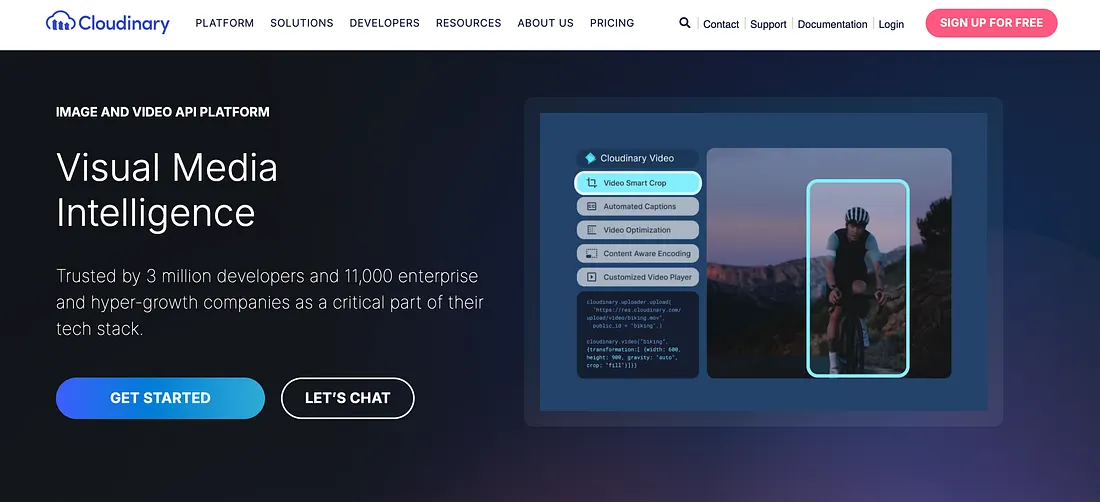
Cloudinary is an image storage API and media management platform that lets developers upload, transform, optimize, deliver, and manage visual assets.
Features of Cloudinary Image API
Robust upload and asset management: Upload, store, list, organize, tag, and manage images programmatically via simple API calls or SDKs in popular languages.
Dynamic image transformations: On-the-fly resizing, cropping, format conversion, filters, overlays, background removal, and other edits via dynamic URLs or SDKs.
Automatic optimization: Images are automatically compressed and delivered in the best format and quality based on device type, network, and browser, boosting performance and Core Web Vitals.
AI and smart capabilities: Auto-tagging, smart cropping, and generative transformations help automate repetitive tasks and ensure visuals are optimized and consistent.
Global delivery: Uses a global CDN for fast image serving worldwide and supports responsive images tailored to different screens.
Best use case for Cloudinary API
Cloudinary is ideal for digital products, e-commerce platforms, and content-heavy applications that need scalable image workflows, automatic optimization, and advanced dynamic transformations without building custom tooling. It’s especially valuable where performance, SEO, and visual consistency matter, like product galleries, user-generated content platforms, and responsive sites with high-resolution visuals.
4. Unsplash Image API
Next on my list is Unsplash, a stock image API for finding stunning, high-quality photographs. It offers over 3 million high-resolution photos from around 300,000 photographers across the globe. The Unsplash Image API is easy to use and made to work smoothly with all sorts of applications.

Features of Unsplash Image API
- Massive Photo Library: Get access to over 3 million professional photos, perfect for any project needing great visuals.
- Easy Integration: The API uses a simple JSON format and comes with official support for JavaScript, PHP, and Ruby. It also works well with other programming languages like Go, Python, and Swift.
- Mobile-Friendly: With SDKs for both Android and iOS, it’s easy to use Unsplash images in mobile apps.
Use Cases for Unsplash API
The Unsplash API is particularly beneficial for digital media publishers who require a regular supply of unique and high-quality images for content such as articles, blogs, and features.
These publishers often need visually striking images that capture the essence of their stories or themes. Unsplash’s vast library and ease of integration allow these content creators to seamlessly enhance their articles with relevant and engaging imagery, improving reader engagement and contributing to the aesthetic appeal of their digital platforms.
5. Photo AI
PhotoAI revolutionizes the way we use images by offering AI-enhanced visuals that stand out. This platform allows you to integrate AI-generated images easily into any application, making it a go-to for innovative and fresh visuals.

Some Features of PhotoAI Image API
- AI-Enhanced Images: Tap into a collection of images enhanced with artificial intelligence software, perfect for creating eye-catching and unique visuals.
- Seamless Integration: Designed with ease of use in mind, the API works perfectly with various development environments via a straightforward JSON interface.
- Diverse Visuals: Ideal for developers looking for creative twists without the hassle of traditional image-sourcing methods.
Best Use Case for PhotoAI API
PhotoAI is particularly valuable for e-commerce platforms looking to enhance their product listings with unique, AI-generated images. These platforms often require high volumes of visually compelling content to attract and engage customers.
PhotoAI enables them to automatically generate distinctive images that can be used for featured products, promotional banners, or even customized user experiences based on shopping behavior. This capability, powered by generative AI for customer experience, is crucial for maintaining fresh and engaging content, helping to increase conversion rates and keep the website visually appealing without constant manual updates.
6. HeadshotPro API
HeadshotPro offers professional, high-quality headshot images, making it ideal for enhancing the professional appeal of any digital platform. The HeadshotPro Image API allows for easy integration of these images into websites or apps.

Features of HeadshotPro Image API
- Professional Headshots: Access a vast collection of premium, professional headshot images suitable for a range of applications.
- Versatile Integration: Supported by robust libraries in popular programming languages like JavaScript, PHP, Ruby, as well as Go, Python, and Swift.
- Mobile Compatibility: With SDKs available for both Android and iOS, integration into mobile platforms is straightforward and efficient.
Best Use Case for HeadshotPro API
This API is perfect for corporations and professional services firms that need to maintain a high standard of professionalism online. Whether updating staff profiles on a company website or enhancing user interfaces with professional imagery, HeadshotPro provides the essential visual quality that reflects professionalism and credibility.
7. Lorem Picsum
Lorem Picsum offers a straightforward and efficient solution for obtaining high-quality placeholder images, perfect for use in design and development projects. With its easy-to-use setup, you can quickly insert random yet aesthetically pleasing images into your projects.

Some Features of Lorem Picsum API
Easy to Use: Simply append the desired image dimensions (width & height) to the URL (e.g., https://picsum.photos/200/300 to receive a random image. High-Quality Images: Provides high-resolution images that are ideal as placeholders during the design and testing phases. Flexible Integration: Effortlessly integrates with any project needing placeholder images without complex configurations.
Best Use Case for Lorem Picsum API
The Lorem Picsum API is ideal for web developers who need to quickly populate prototype websites or application interfaces with visual content. It’s particularly useful in scenarios where the final images have not been selected yet, allowing the development process to continue without delays.
This API helps maintain the design integrity during client presentations or user testing, ensuring that the visual layout is communicated effectively even when final images are still under consideration.
8. Midjourney
Midjourney is a platform designed to revolutionize the way businesses use visuals. This API allows you to enhance your online presence with unique, AI-generated images that are both captivating and true to your brand’s identity.

Some Features of Midjourney
- AI-Generated Creativity: Employs advanced AI algorithms to create distinctive images that stand apart and engage viewers.
- Customizable Outputs: Provides the ability to fine-tune images to align with specific branding goals, ensuring every visual communicates the right message.
- High Integration Capability: Effortlessly integrates into existing digital frameworks, enriching web and mobile applications with innovative visuals that draw attention.
Best Use Case for Midjourney API
Perfect for creative agencies and marketing firms, Midjourney enables a rapid generation of fresh, visually arresting content for advertising campaigns or social media.
This API helps these firms deliver tailor-made visuals that engage their audience, all while saving time and reducing dependency on traditional graphic design resources.
Bonus: The NASA API
Blast off into a universe of images with The NASA API!
Perfect for when your project needs a little space — literally. This API is your ticket to NASA’s incredible gallery of cosmic wonders: from glam shots of distant galaxies to the solar system’s latest selfies, and everything interstellar in between.

Final Thoughts
Thank you for taking the time to read this article. I hope it gave you a clearer idea of what’s available when it comes to image APIs.
Every product has different needs. Sometimes you just need access to images, and sometimes you want to automate how images are created or handled inside your product.
So before choosing an API, take a moment to think about what your product actually requires. Once that’s clear, picking the right solution becomes much easier.
A little about me — I am Peter, and the founder of templated.io, which is an API for image and PDF generation.
If you happen to produce images at scale, templated can be the right solution for you. Give it a spin with 50 free credits & see if it is the right fit for you.
Frequently Asked Questions
Which image API is best for a website or application?
It depends on the feature you need. Use Pexels or Unsplash for stock images, Cloudinary for media storage and optimization, Templated for branded content generation, and Lorem Picsum for placeholder images.
What is the best free image API for developers?
Pexels and Unsplash are popular free image APIs for accessing photos. Both have usage limits and integration guidelines that developers must follow.
What is the difference between stock, generation and storage image APIs?
A stock image API retrieves existing photographs. A generation API creates new visuals from prompts, templates or data. An image storage API manages, transforms and delivers uploaded media. Can Pexels and Unsplash API images be used commercially? Generally, yes. However, API integrations must follow each platform’s attribution, hotlinking and usage requirements. But you must review the Pexels API guidelines and Unsplash API guidelines before publishing.
Which image API is suitable for adding branded image generation to a SaaS product?
Templated is suitable when a SaaS product needs to generate consistent, branded images from reusable templates and customer data. It also supports image, video, and PDF outputs through the same API. What should developers check before choosing an image API? Check its licensing rules, rate limits, pricing, output formats, documentation, SDK support, and whether it can handle your expected request volume.