· AI · 3 min read
How To Quickly Build a Base Template With AI for Your Automation
Quickly create base templates for automation using Templated’s AI Generator. Generate ready-to-use templates for social media, certificates, or invitations, then edit them in the editor. Use prompts or sample images for personalized, time-saving templates.

Imagine you have started to work on an automation project, but you need a base template. Of course, you can create a template from scratch, which is also time-consuming and would consume your time.
Here is some good news: you can quickly generate a base template using AI. Templated offers you an AI Template generator, which you can use to generate templates for your social media campaigns quickly.
With this tool, you can instantly create templates by just prompts, be it a certificate, an image for your emails, a birthday invitation, or any social media campaign. It instantly builds a ready-to-use template for you.
The best part is that once AI generates the template, you can do the editing in the editor to make the template according to your preference and style. Let’s quickly get started.
Steps to Build a Base Template With AI for Your Automation
Step 1: Sign Up and Create a Template
Firstly, you have to sign up for a Templated account, and after that, choose Create Template. 
Step 2: Choose AI Generator
In the options given, choose AI Generator. 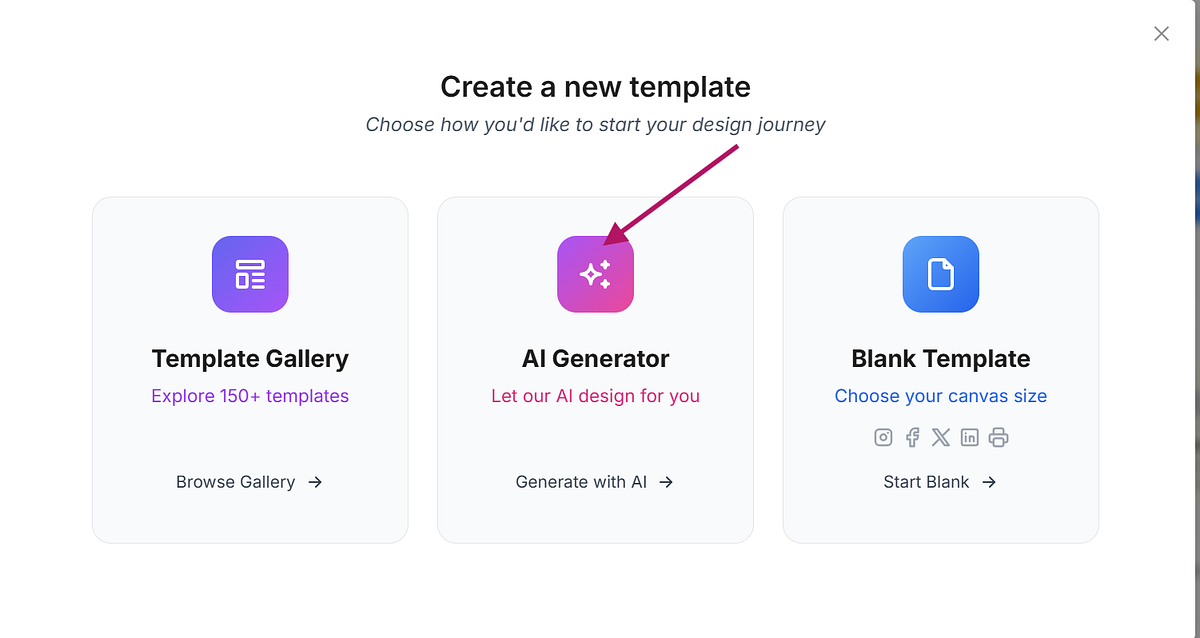 There are example prompts we have given; you can choose any one of them to test the output it gives. For the sake of this tutorial, let's check the "Service Review" template.
  And a review template is ready.
Step 3: Edit the Template in Editor
 Now, if you want to do edits, you can go to the editor. So click on the Open in Editor.
  In the editor, you can adjust layers, add extra layers if needed, and even insert the business name/logo.
  You can programmatically change the review, the reviewer name, and even the star ratings.
Step 4: Automate Your Templates
There are a couple of tutorials on automations we have; you can check out building certificate automation using Make, or building Facebook post images using n8n for reference.
In case you don't want to use any of the no-code tools, there's a simple method that uses .CSV file to automate, check it out here.
Tips to Get Better Results from AI for Templates
You can also build your template by giving a good prompt.
Start with Purpose: Know the purpose, what you want to automate, whether a PDF, image, or video, and the use cases behind it before writing the prompt.
Be Specific: Include details like colours, objects, and font styles.
Provide Context: Mention the occasion or purpose of the template.
Use Descriptive Adjectives: Words like "playful," "cheerful," "professional," or "minimalistic" help the AI understand the desired mood.
Use Sample Images if Needed: Uploading a reference image can guide the AI to create a template that matches your style.
Let's see in the example how you can do it.  And the birthday card is ready according to the prompt.
  So now you can open this in the editor and change the background colour, font style, and even the message if you want. You can also automate this template according to your workflow.
Create Templates Using a Sample Image
You can also create the template by giving the sample image template if you have one. In the AI generator, click on add image and give an image it will make a similar template. 
Conclusion
When you want to build a base template for automation, this AI method is quick and time-saving. You can generate templates from scratch in different ways, and automation can save you time in repetitive tasks.
For using prompts or sample images, you can create personalised templates that suit your workflow perfectly. In any case, if you need our help to integrate Templated into your workflow, we are available on chat!
Additional Resources
4 Best Image APIs for Automation in 2025
Automate Certificate Generation via Templated's Built-In Dashboard Spreadsheet Feature
Automate Personalized Welcome Email Images with Templated and Make
Automate Your Image Generation using Spreadsheets (No code needed)